
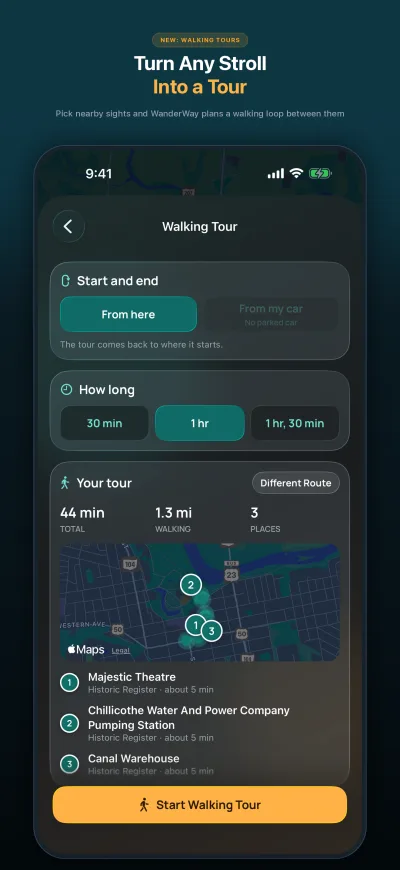
Walking Tours
Plan a 30-, 60-, or 90-minute walk from stop to stop and follow it on foot, with the places along the way.
Every mile has a story. WanderWay is scenic navigation for everyday drives and longer trips, on iPhone, iPad, and Apple CarPlay. Discover historic landmarks, timber covered bridges, state parks, and panoramic overlooks along your route with live directional narration and Curated Routes.
New in 2.2 Walking tours, Sunset Drives, Photo Recap, and Zoo & Aquarium and Military History places. Try everything free for 14 days, then keep it with one purchase. See what’s new ↓
Free to download. Try everything for 14 days, then unlock it with a one-time purchase. Other planners bill yearly; WanderWay charges once.
1,500+ downloads by scenic drivers, as of October 2026.
No ads. No subscriptions. No selling your personal data.
✓ Try everything free for 14 days. Nothing is charged unless you choose to unlock.
iPhone, iPad & CarPlay · iOS 26 or later · Available on the App Store
What’s new
WanderWay 2.2 is for walks as well as drives.
Plan a 30-, 60-, or 90-minute walk from stop to stop and follow it on foot, with the places along the way.
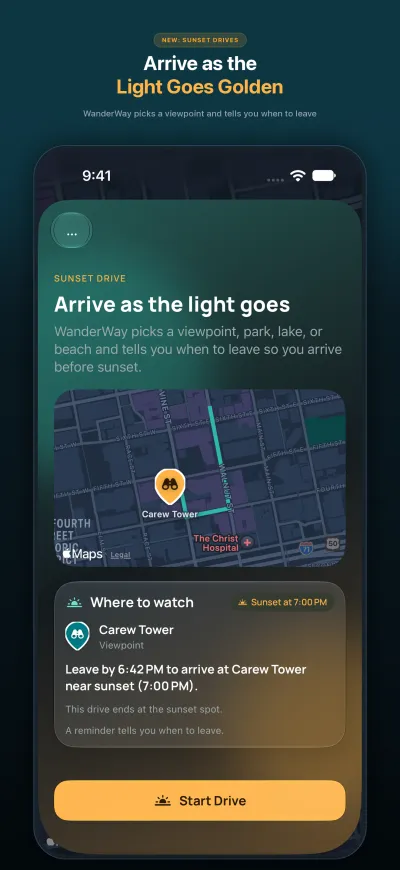
Pick a viewpoint, park, lake, or beach, and WanderWay tells you when to leave so you arrive before sunset.
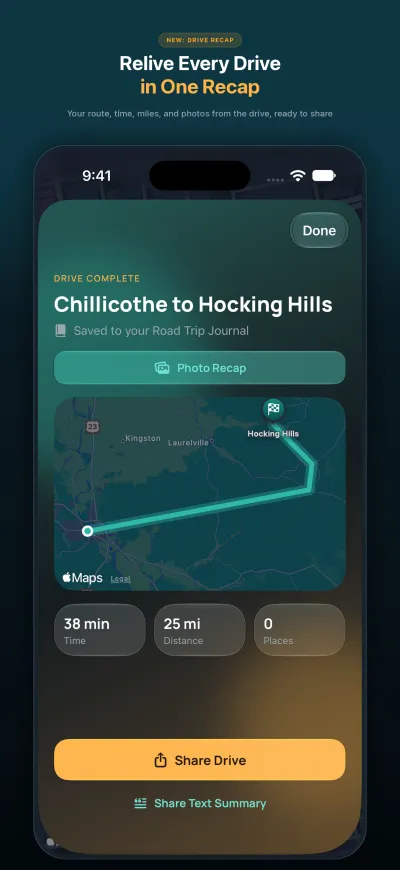
When a drive or a walk ends, see the route, visit stamps, and photos from along the way. The photos stay on your device.
See everything new in WanderWay 2.2 →
Planning a trip? Read the guides to covered bridge road trips, Skyline Drive, Big Sur on Highway 1, and Ohio scenic byways.
App previews
The App Store previews, recorded in WanderWay on iPhone and Apple CarPlay.
Curated Sightseeing Categories
Whether you’re cruising rural backroads, wandering an old canal town, or planning an afternoon loop, filter your radar with one tap or let WanderWay narrate what lies just around the bend.
Historic timber trusses, rare Burr arches, and scenic rural stream crossings.
Ridge panoramas, river valley vistas, and roadside scenic turnouts.
County milestones, founding signposts, and forgotten local stories.
National Register listings: homes, districts, and landmarks with a documented past.
Prehistoric Hopewell and Adena mounds, canal locks, and other places that carry local heritage.
19th-century charcoal iron furnaces, abandoned stone mills, and crumbling foundations.
Castles, forts, and grand estates with a story behind the walls.
Pioneer settlements, canal history centers, and regional heritage societies.
Statues, obelisks, and monuments that mark a place or a person.
Memorial gardens and quiet places set aside to remember.
Heritage murals, sculpture, and unique roadside installations.
Roadside attractions and local favorites worth a short stop.
State parks, old-growth forests, tranquil ravines, and botanical gardens.
Nature preserves, state forests, and wildlife areas.
Hidden cascades and falls worth a short walk to see and hear.
Lighthouses that have guided ships along the shore.
Zoos and aquariums, a good reason to leave the highway.
Forts, battlefields, and memorials of military history.
Historic churches and houses of worship. Off until you turn it on.
Orchards and farm markets for fresh fruit and seasonal picking. Off until you turn it on.
Quiet burial grounds and hand-carved 18th and 19th-century markers. Off until you turn it on.
Fenced parks where a dog can run off the leash.
Public courts and pitches for a game on the way.
Other places worth a look along the route.
Less passing by. More finding out.
You don’t have to plan a long trip to find something worth seeing. WanderWay helps you uncover interesting places nearby, learn their stories, and weave them into the drive you’re already taking.
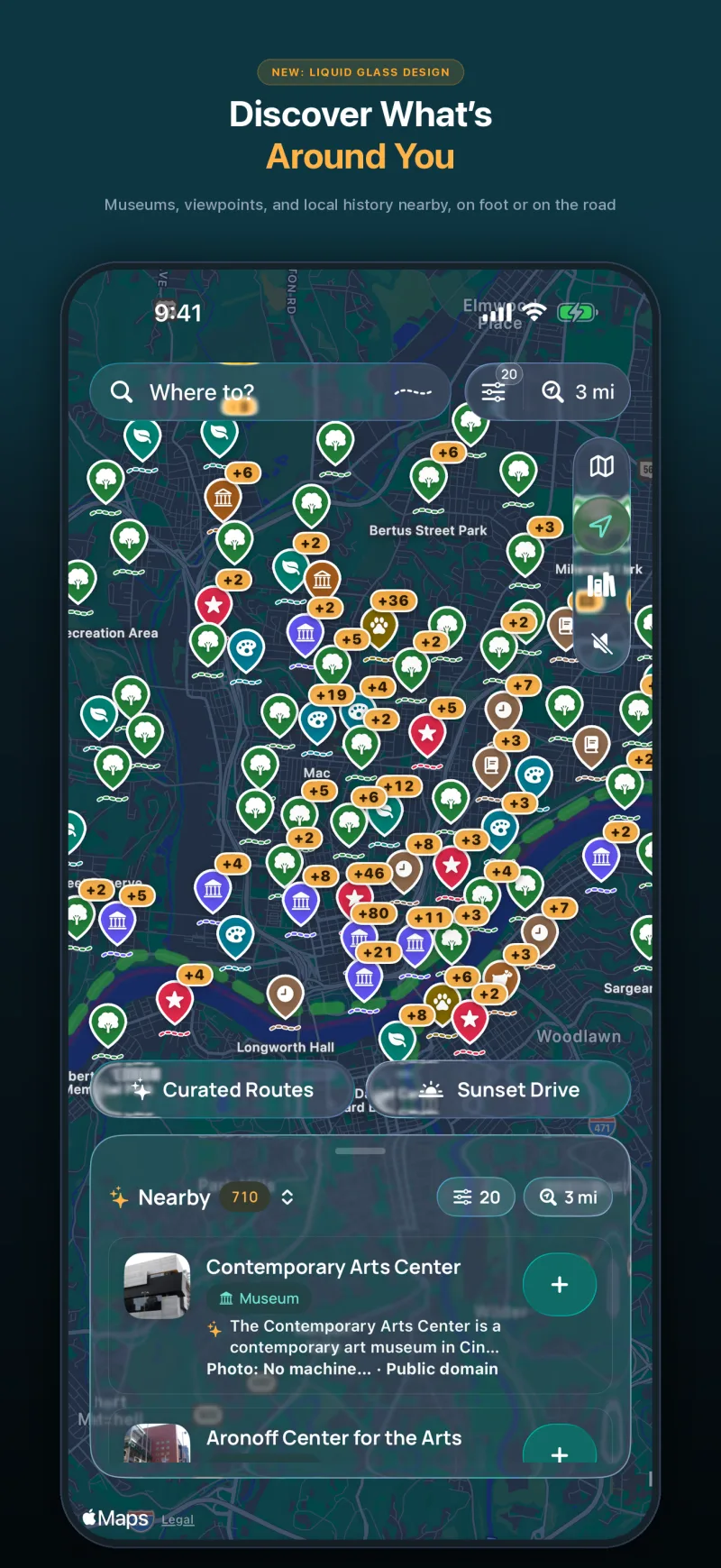
Browse covered bridges, scenic overlooks, museums, historical markers, ruins, and parks. Choose from 24 categories or toggle “Drive-By Sights Only” for effortless window sightseeing up to 40 miles (or 60 km) around you.
Open Curated Routes for a scenic loop that starts and ends where you are, or search any destination, add stops, and let highway-aware route optimization order your route. Tap “Make this drive more scenic” to add a Scenic Detour. Get alerts for opening hours and download offline guides before losing cell signal. Compare our scenic loops to Google Maps.
Follow visual and spoken turn-by-turn directions with directional sight narration (“Ahead on your right...”) and short stories about the places you pass. When your drive ends, it’s saved to your Road Trip Journal with the roads you drove and the places you passed. Read about WanderWay’s story.
Explore in-dash CarPlay ↗Spoken roadside narration
Traditional navigation only tells you when to turn. WanderWay is your local copilot, using your vehicle’s heading and speed to announce discoveries as they appear out your windows.
1829 double-barrel Burr arch truss over Seven Mile Creek. One of the oldest surviving covered bridges in the nation.
Early Scioto Valley settlement grounds with hand-carved sandstone markers dating back to 1804.
Picturesque 337-acre reservoir surrounded by forested Appalachian foothills. Scenic overlook just ahead.
Story Mode
As you approach a place, hear a short story about it, or tap “Listen to the story” on its page. While you navigate, the Nearby panel still shows the detour time to each nearby place.
Turn on Narrate Without a Route, open WanderWay, and drive. Nearby places, and their stories, are spoken as you pass. It keeps going with your iPhone locked and stops when you park.
With Apple Intelligence, stories are written on your iPhone from the place’s description. Other iPhone models read a shortened description.
The Lock Screen and the Dynamic Island show your next turn, plus the next place ahead and how far away it is.
Make the map match your mood
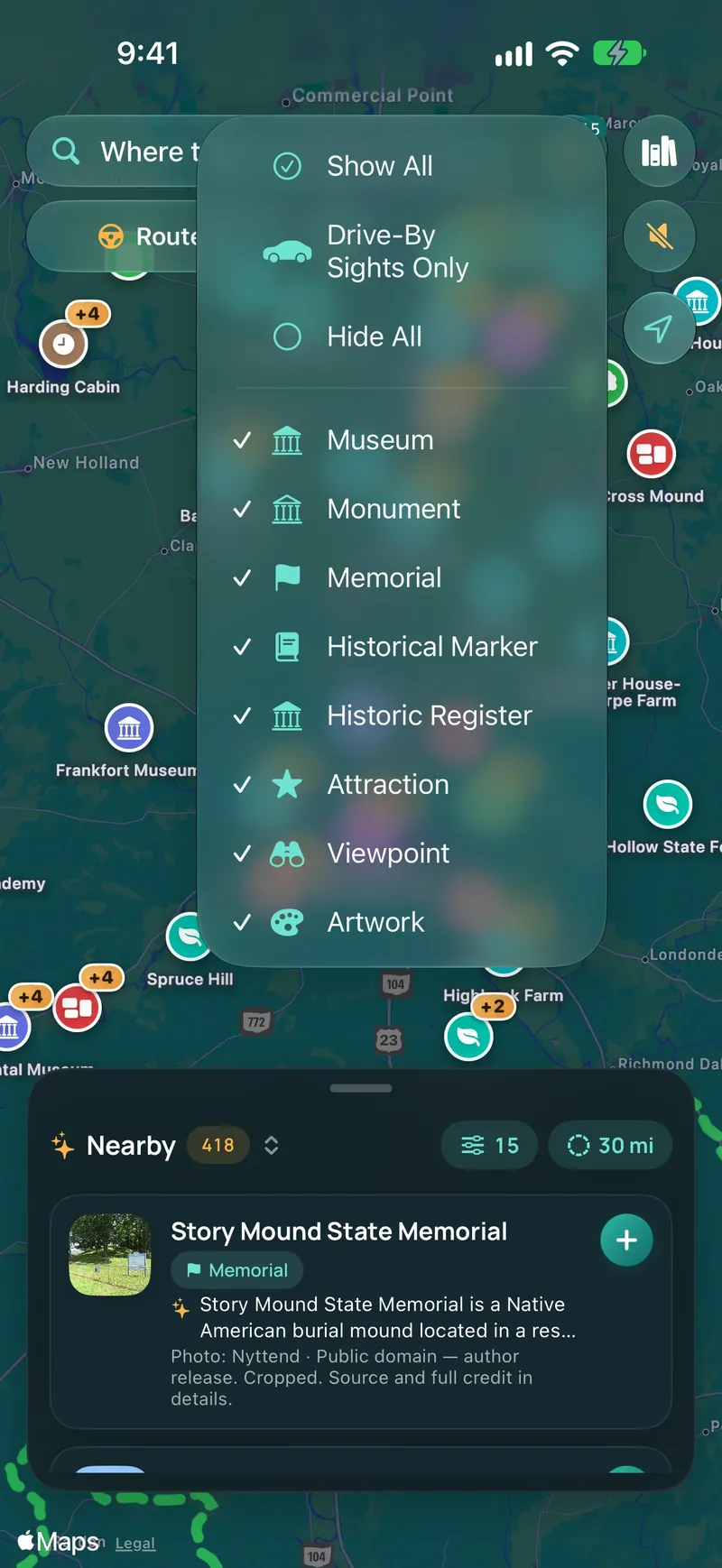
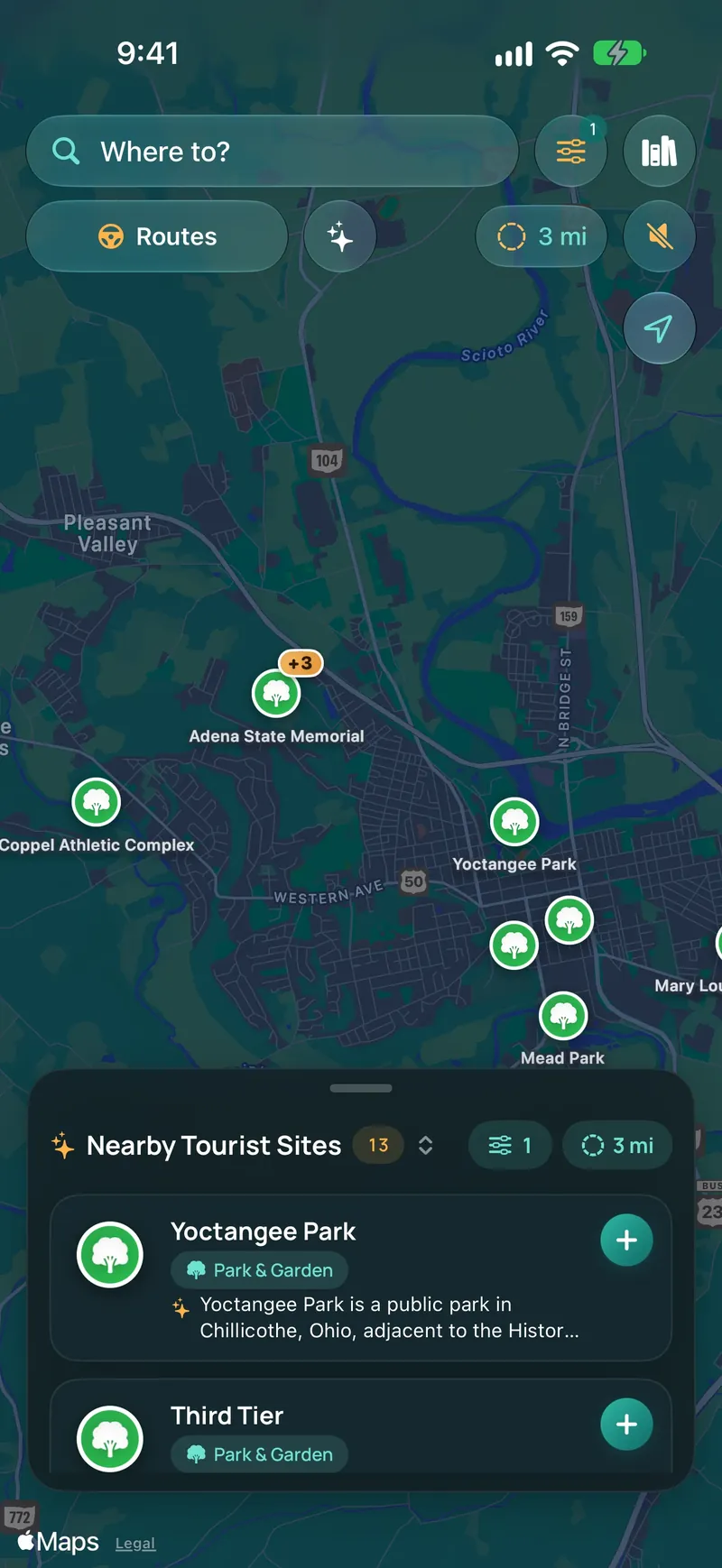
Tap the category button at the top of the map, or the one in the Nearby panel, and choose the places you want to find. The menu stays open while you choose, so you can Hide All, then pick a few. Spend an afternoon among parks and gardens, look for a museum, or focus on sights you can enjoy from the road.
An afternoon. A little curiosity.
Take a Sunday drive with Curated Routes. Choose a time budget from 30 minutes to five hours, highlight the sights you love, and preview a scenic loop that starts and finishes where you are, or a drive to a destination. The planner checks the forecast, and you can add a Scenic Detour to any route.
Start with the time you have
Open Curated Routes, choose a duration (from 30 min up to 5 hr), and prioritize your favorite kinds of sights. Want winding country roads? Turn on “Prefer Scenic Backroads” to bypass multilane interstates.
Tap Generate Route, and the planner proposes a loop past nearby sights, with each stop, the total time, and the extra driving and distance. Like it? Tap Start Drive. Want something different? Tap Generate Again.
See the 2.2 screens ↗Scenic Detours
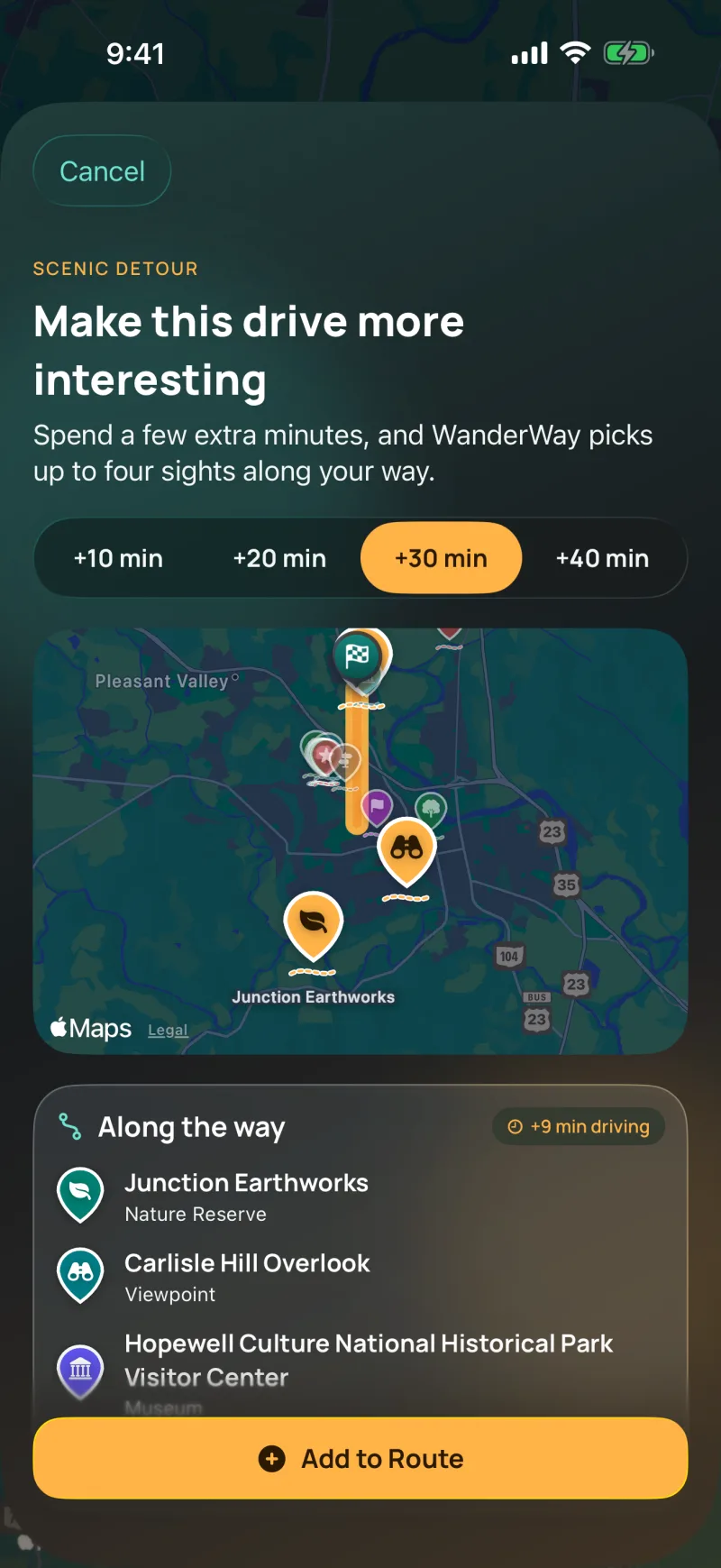
Planning a route or a Curated Route? Tap “Make this drive more scenic.” In 2.2 you can spend up to 40 extra minutes, and WanderWay picks up to four sights along your way, favoring covered bridges, viewpoints, historic sites, and US scenic byways.
You see the extra driving time and the new route on a map before you add the sights.
Generate closed-circuit loops that return home without backtracking. Preview every waypoint before you pull out of the driveway.
Favor US scenic byways (dashed green on the map) and prefer backroads to guide your drive through tree-lined state routes, creek valleys, and quiet rural counties.
With Adjust for Weather on, a wet forecast tips the plan toward indoor stops.
Need a place to start? Read our guides to finding covered bridges along your drive, Ohio scenic byways and scenic loops, Skyline Drive through Shenandoah National Park, and Big Sur on California’s Highway 1.
Road Trip Journal & Passport
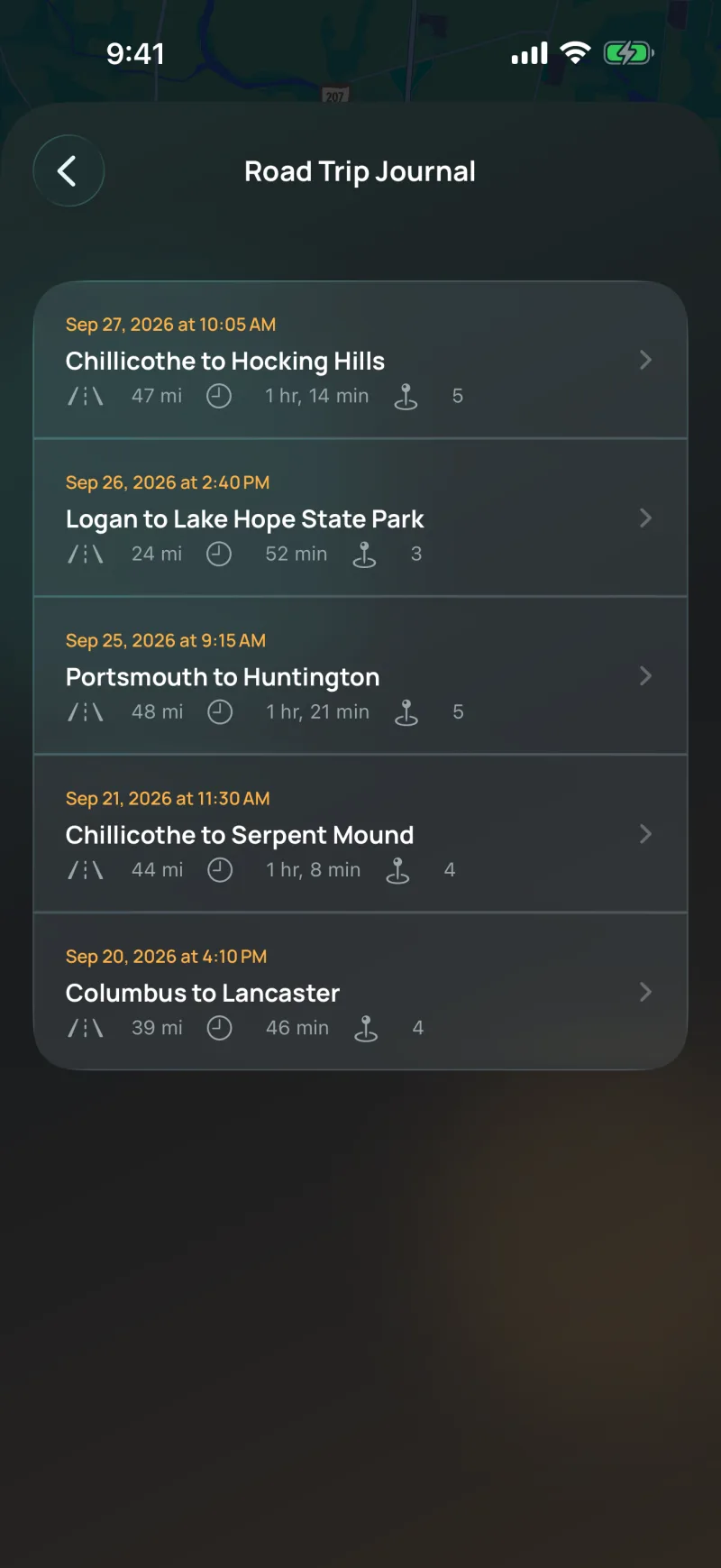
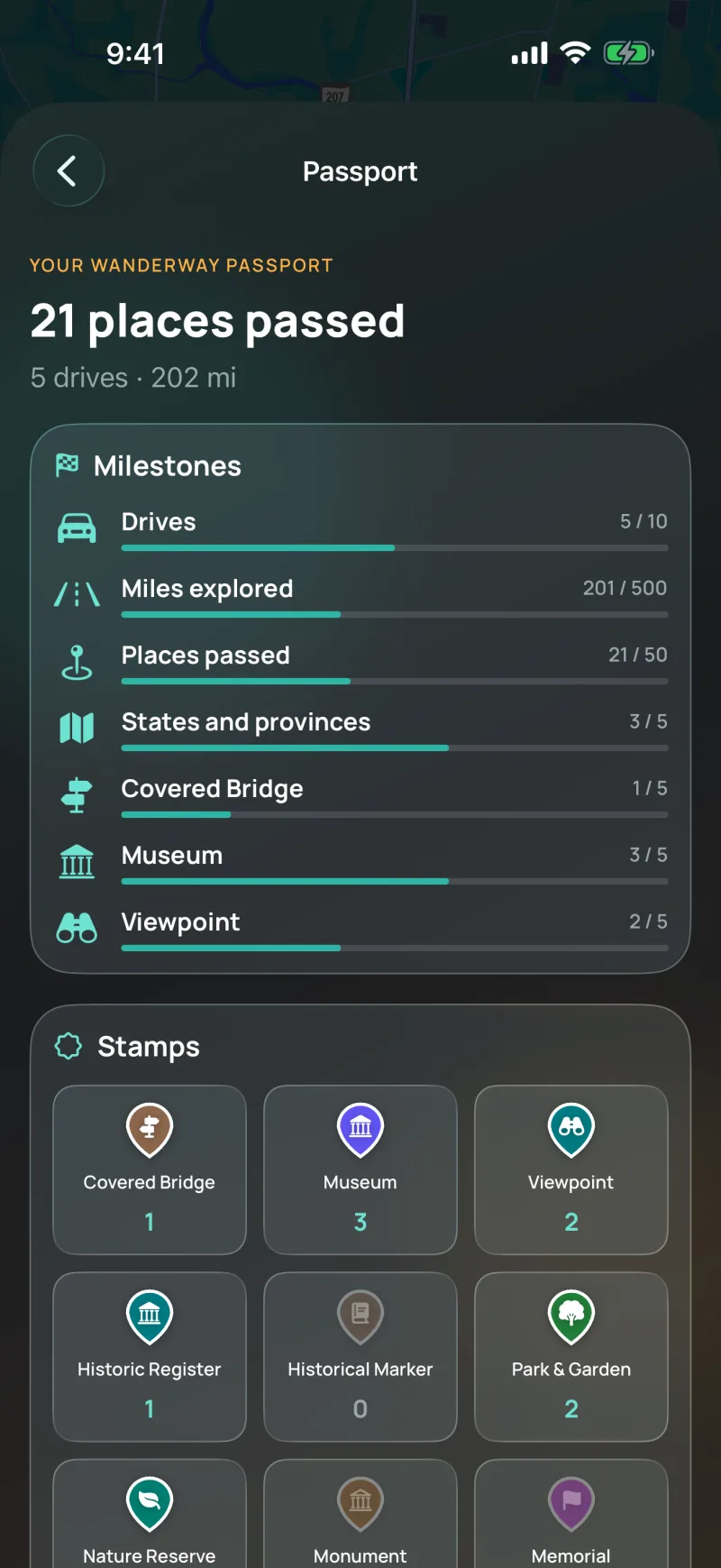
Each drive you navigate is saved with the roads you drove, the places you passed, and the states or provinces you crossed. Your Road Trip Journal stays on your iPhone.
Designed for the dash
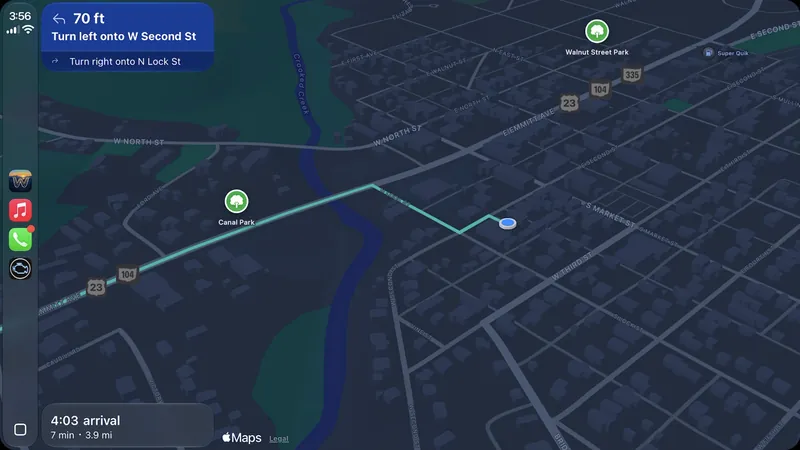
Bring your curiosities to your vehicle’s center display. Browse nearby sights with their detour times, hear a place’s story, and see the rest of your drive with Show Route Overview.
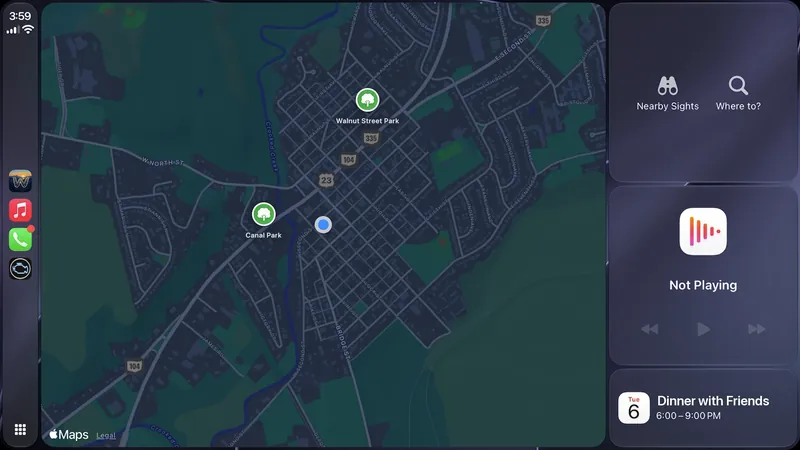
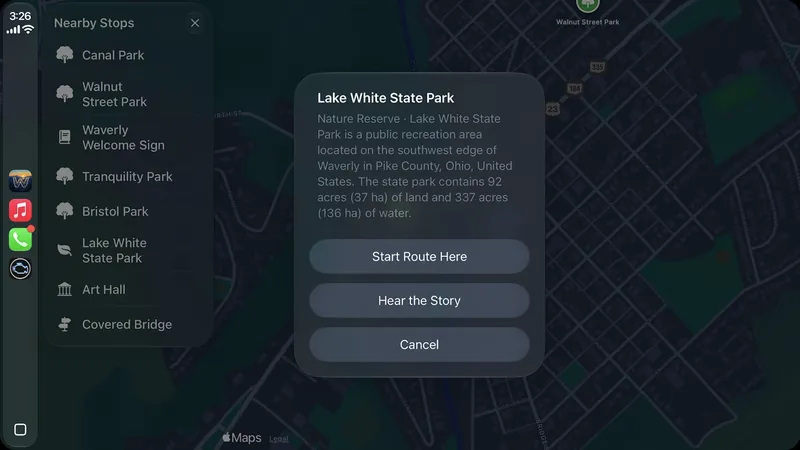
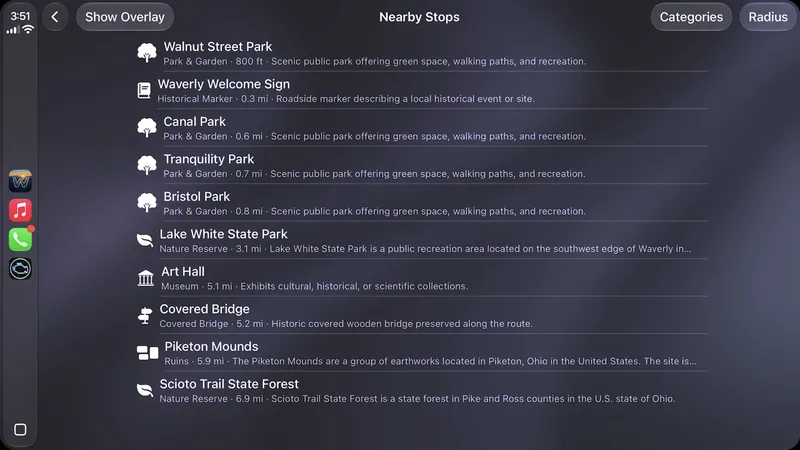
Plug in your iPhone and start driving. Works natively with Apple CarPlay for safe, passenger-friendly discovery.
Inside WanderWay
The WanderWay 2.2 App Store screenshots. Select any screen to inspect in full detail.
On the record
WanderWay is new and built by one developer. These dates and approvals come from Apple, so you can confirm them yourself.
WanderWay passed Apple’s App Review and went live for iPhone and CarPlay.
My Places, What did I just pass?, longer Scenic Detours, Italian, and iPad, plus rerouting that follows your direction of travel and better place names. Still free to download with a 14-day trial of every feature, then a one-time purchase.
Navigation apps need Apple’s approval before they can run on a car’s CarPlay display. WanderWay has it.
Clear and transparent
WanderWay is an independent project created to make drives more rewarding. Need help or have suggestions? Visit our Support Guide or get in touch through our contact page.
WanderWay uses Apple Maps for turn-by-turn routing, so you get the same reliable routing engine that powers Apple Maps. What WanderWay adds is the discovery layer: 24 place categories, Curated Routes, and spoken directional narration that Apple Maps does not provide.
Standard navigation apps are built for speed and efficiency—getting you from A to B as fast as possible on highways. WanderWay is built for the journey: discovering hidden historic sites, covered bridges, scenic overlooks, and state parks along your route, complete with spoken directional narration and Curated Routes.
Walking Tours: plan a 30-, 60-, or 90-minute walk from stop to stop and follow it on foot, with the places along the way.; Sunset Drives: pick a viewpoint, park, lake, or beach, and WanderWay tells you when to leave so you arrive before sunset.; Photo Recap: when a drive or a walk ends, see the route, visit stamps, and photos from along the way. The photos stay on your device.; More places: Zoo & Aquarium, Military History, Sports Courts, Waterfall, Lighthouse, Orchard & Farm Market, and Cemetery. Orchards, cemeteries, and sports courts start off; turn them on in the category menu.; Show on Map: in Where to? and Add a Stop, see search results as pins on the map.; A tidier guidance screen: your arrival time, the weather at your destination, and a rain heads-up share one card, beside a small End button.; Apple Watch: see your next turn on your wrist during navigation.; Cleaner place pages with an easier-to-tap Done button.; Curated Routes: the new home for your Sunday drive. Build a loop or a drive to a destination, from 30 minutes to 5 hours.; Saved When You Start: when a drive or a walk starts, WanderWay can download the route so the sights and descriptions stay with you. On cellular data, it asks first.; Fresher places: places you've already loaded refresh in the background once they're a week old, or when newer place data is out.; Choose your map: Standard, Satellite, or Hybrid. CarPlay uses the same choice.; A new Liquid Glass look for pins, routes, and controls, in light and dark.; Steadier GPS: a brief gap no longer counts as a lost signal, and WanderWay tells you if Precise Location is off.; Now in Portuguese, Dutch, Polish, Swedish, and Ukrainian.
No. WanderWay has zero ads, zero recurring subscriptions, and zero selling or tracking of personal data. It’s free to download with a 14-day free trial. After that, a one-time purchase keeps these unlocked: navigation on iPhone and CarPlay, Story Mode while you drive, Narrate Without a Route, Scenic Detours, curated drives, offline downloads, and searches up to 40 miles. Nearby places within 5 miles, place details and photos, destination search, and route previews are always free.
WanderWay monitors your vehicle’s real-time heading and speed. When you approach an interesting site, it announces its position relative to your vehicle: “Ahead on your right, Roberts Covered Bridge” so you never have to look down at your screen while driving.
As you approach a place, WanderWay reads a short story about it. Turn it on in Settings › Points of Interest › Narration Length › Story, or tap “Listen to the story” on a place page to hear it right away. With Apple Intelligence, stories are written on your iPhone from the place’s description. Other iPhone models read a shortened description.
Yes, on your iPhone. Each drive you navigate is saved to your Road Trip Journal with the roads you drove, its distance and time, the places you passed, and the states or provinces it crossed. You can show the photos you took along the way, which stay in your photo library, and Share Drive turns any drive into a picture card. WanderWay keeps no location history or routes on a server.
Yes, for the places along your route. You can download the places and descriptions along your planned route before heading into river valleys or remote hills where cellular reception is spotty. Maps and routing may still need a connection, so set up your route before you lose signal.
Yes, on iPhone. WanderWay runs on Apple CarPlay with turn-by-turn guidance, nearby sights with detour times, and drives you can start from search, a saved trip, a favorite, or by voice. CarPlay includes a WanderWay map card on CarPlay Dashboard with Nearby Sights and Where to? shortcuts, Show Route Overview, Hear the Story, a map and turn details in the instrument cluster in cars that support it, and Resume if the car’s built-in navigation takes over. In 2.2, Just Passed and Add a Stop are on CarPlay too. iPad doesn’t include CarPlay.
Yes. On iPhone, press and hold anywhere on the map to drop a pin, named from the nearest address. Tap Search Here to list tourist sites within your chosen radius around the pin instead of around you, use the directions button to route there, or close the pin to return the list to your surroundings. Dropping a pin isn’t available during active navigation.
Try everything free for 14 days first. The trial ends on its own and never charges you. If you buy the unlock and change your mind, refunds go through Apple at reportaproblem.apple.com; Apple reviews each request, and customers in some regions, such as the EU and UK, can cancel within 14 days of purchase.
Ready for your next drive
Free to download with a 14-day free trial, then a one-time purchase. No ads, no recurring subscriptions, and zero tracking of your personal data. Compatible with iPhone, iPad, and Apple CarPlay on iOS 26 or later.
✓ Free for 14 days · Unlock once, only if you love it · No subscription